MacBook Water Damage Repair in Sacramento: Act Fast & Save Your Laptop
It happens in an instant — a knocked-over coffee mug, a spilled water bottle, or a sudden rain caught without a bag cover. Your MacBook gets wet, and your stomach drops. The good news: a water-damaged MacBook is often fully recoverable — but only if you act fast and make the right moves in the first few minutes.
At MNM Computers in Citrus Heights, we specialize in MacBook liquid damage repair for customers across Sacramento. We've saved hundreds of water-damaged MacBooks that owners thought were total losses. Here's exactly what to do — and what not to do — the moment water meets your MacBook.
The First 5 Minutes Matter Most
The actions you take in the first five minutes after a spill can mean the difference between a $200 repair and a $1,200 logic board replacement. Follow this guide immediately.
✓ DO These Things
- Turn it off immediately — hold the power button
- Unplug all cables, including the charger
- Flip it upside down to drain liquid away from components
- Remove any external devices (USB drives, dongles)
- Bring it to a repair shop as soon as possible
✗ DON'T Do These Things
- Turn it on to "check if it still works" — this causes shorts
- Use a hair dryer or heat source — heat spreads corrosion
- Put it in a bag of rice — rice does nothing for MacBooks
- Leave it overnight hoping it will dry on its own
- Shake it aggressively — this spreads liquid further inside
Speed is critical. Corrosion begins forming on your MacBook's logic board within hours of liquid exposure — not days. Every hour you wait reduces the chance of a full recovery.
Why Rice Doesn't Work on MacBooks
The "put it in rice" remedy is one of the most persistent myths in consumer tech, and it causes more harm than good with MacBooks specifically. Here's why:
- Rice absorbs atmospheric moisture — but your MacBook's problem is liquid on its logic board, not humidity
- Rice cannot reach inside a sealed MacBook chassis to absorb the liquid that matters
- More critically, rice does nothing to stop corrosion — the electrochemical process that begins destroying copper traces and solder joints the moment water makes contact with powered circuitry
- Leaving a water-damaged MacBook in rice for 24–48 hours while corrosion spreads dramatically worsens the final repair outcome
- Rice dust and starch particles can actually get inside ventilation slots and create additional problems
MacBooks have complex multi-layer logic boards with densely packed components. The only real remedy for liquid damage is professional ultrasonic cleaning and corrosion removal — not a bag of Minute Rice.
What Happens Inside a Water-Damaged MacBook
Understanding what's actually happening inside your MacBook helps explain why time is so critical:
Immediate Short Circuits
The moment liquid bridges two electrical contacts, a short circuit occurs. If the MacBook was powered on, this can instantly damage components. This is why powering it off immediately is the single most important step — cutting power stops the short circuit damage.
Corrosion Spreading Across the Logic Board
Water alone isn't the primary enemy — it's the minerals and contaminants in water combined with electricity that cause corrosion. Even after the MacBook is off, residual charge in capacitors and batteries can continue driving electrochemical corrosion across copper traces, solder joints, and component pads.
Keyboard Matrix Damage
MacBook keyboards use a membrane matrix that is extremely sensitive to liquid. Even small amounts of water can cause multiple keys to stop working or register phantom presses. Apple's butterfly and scissor-switch keyboards are particularly vulnerable.
Battery Swelling Risk
Liquid that reaches the battery cells can cause dangerous chemical reactions leading to battery swelling or, in severe cases, thermal runaway. A swollen battery is a safety hazard and requires immediate replacement.
Our MacBook Water Damage Repair Process
When you bring a water-damaged MacBook to MNM Computers, we follow a professional, systematic recovery process:
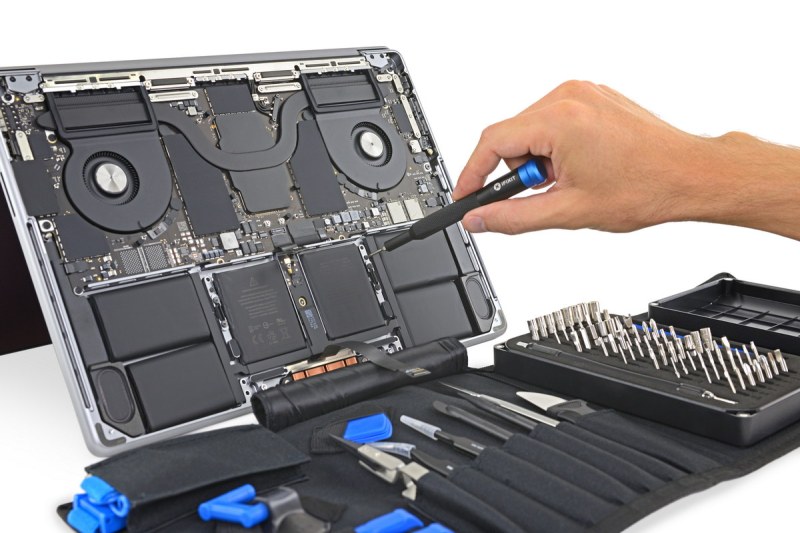
- Immediate disassembly — we open the MacBook and visually assess the extent of liquid intrusion and existing corrosion
- Ultrasonic cleaning — the logic board is placed in our ultrasonic cleaner with specialized electronics cleaning solution, which uses high-frequency sound waves to remove corrosion, mineral deposits, and contaminants from every surface including between chips and under BGA components
- Corrosion removal — areas of visible corrosion are treated with flux and isopropyl alcohol under magnification, with corroded pads cleaned and re-tinned where needed
- Logic board inspection under microscope — we inspect every section of the board under high magnification, checking for damaged traces, lifted pads, and failed components
- Component-level testing — individual chips and circuits are tested to identify specific failures, allowing for targeted component replacement rather than wholesale board replacement
- Full system reassembly and testing — we reassemble and run comprehensive diagnostics to verify all functions are restored
What Can Be Saved vs. What Can't
The honest answer: most MacBooks brought in quickly can be saved. Here's a realistic breakdown:
- Brought in within 1–2 hours: Excellent prognosis. Full recovery rate is very high with proper cleaning
- Brought in within 24 hours: Good prognosis. Some corrosion will have formed but is usually treatable
- Brought in after 48+ hours: Moderate prognosis. Significant corrosion may require more extensive component-level repair
- After attempted rice treatment for days: Reduced prognosis — corrosion has had maximum time to spread
Even in severe cases, your data is almost always recoverable. MacBook SSDs are soldered to the logic board but the NAND flash chips themselves survive liquid damage in the vast majority of cases. Even if the logic board is beyond economical repair, we can typically recover your files.
Frequently Asked Questions
How much does MacBook water damage repair cost in Sacramento?
MacBook water damage repair at MNM Computers typically ranges from $150–$400 depending on the severity of damage and model. We provide a free diagnostic and quote before any work begins — no surprises. Severe cases requiring component-level board repair may cost more, but we'll always tell you upfront whether repair is economical versus replacement.
My MacBook got wet but seems to be working fine — do I still need to bring it in?
Yes — and this is critical. A MacBook that appears to work after getting wet is still at risk. Corrosion continues to develop on the logic board even after the unit dries and seems functional. Many water-damaged MacBooks work for days or weeks before failing suddenly due to advancing corrosion. A professional cleaning within 24–48 hours, even if the Mac appears fine, is the only way to prevent delayed failure.
Does AppleCare cover water damage on MacBooks?
Standard AppleCare does not cover liquid damage. AppleCare+ does include accidental damage coverage (including liquid), but it typically requires a service fee of $99 per incident. If you have AppleCare+, you can either use it through Apple or bring it to MNM Computers — we can often repair it faster and at lower total cost, especially for older MacBook models out of standard Apple support.
If your MacBook has been exposed to any liquid, don't wait. The clock is working against you. Visit us at 7613 Greenback Lane, Citrus Heights, Sacramento CA 95610 or call us now for guidance on what to do next.
For more information on our MacBook services, see our MacBook Repair page. If your phone also got wet, read our guide on water damage phone repair.