MacBook Not Turning On? 6 Causes & Fixes in Sacramento
You press the power button on your MacBook and nothing happens. No startup chime, no Apple logo, no fan spin — just silence and a black screen. It's a deeply unsettling experience, especially if your work, photos, or important documents are on that machine.
The good news: a MacBook that won't turn on is rarely a total loss. In most cases, there's a specific, fixable cause. At MNM Computers in Citrus Heights, we diagnose and repair MacBooks that won't start every week. Here are the 6 most common reasons a MacBook won't turn on — and what can be done about each one.
6 Reasons Your MacBook Won't Turn On
1Dead or Faulty Battery
Symptoms: MacBook powers on only when the charger is plugged in, or doesn't respond at all unless you hold the power button for an extended time. Battery health shows "Replace Now" or "Service Recommended" in System Settings.
What's happening: MacBook batteries degrade with every charge cycle. After 500–1,000 cycles (typically 3–5 years of normal use), the battery can fail to hold enough charge to power the machine through startup. In some cases, a swollen battery can also press against internal components and cause erratic behavior.
The fix: Battery replacement. We stock batteries for most MacBook Air and MacBook Pro models. This is typically one of the faster and more affordable repairs — most battery replacements are completed the same day.
2Damaged Charger or Charging Port
Symptoms: The MagSafe or USB-C charging indicator doesn't light up when connected. The MacBook powers on briefly then shuts down. You notice the charging cable is frayed, bent, or the connector feels loose.
What's happening: If the MacBook isn't charging, the battery will eventually drain completely and refuse to start. USB-C charging ports on newer MacBooks can also accumulate debris or suffer connector damage from regular use, preventing a reliable charge connection. A faulty charger brick is often the simplest and cheapest culprit.
The fix: Try a known-working Apple charger first. If the port itself is the issue, we can clean debris from the port or perform a USB-C port replacement. Bring it in and we'll test the charger and port for free.
3Failed Logic Board (MLB)
Symptoms: Completely dead MacBook — no response whatsoever even with a working charger and battery. May have failed suddenly, or after an impact or liquid exposure. Sometimes preceded by random shutdowns, kernel panics, or graphical glitches.
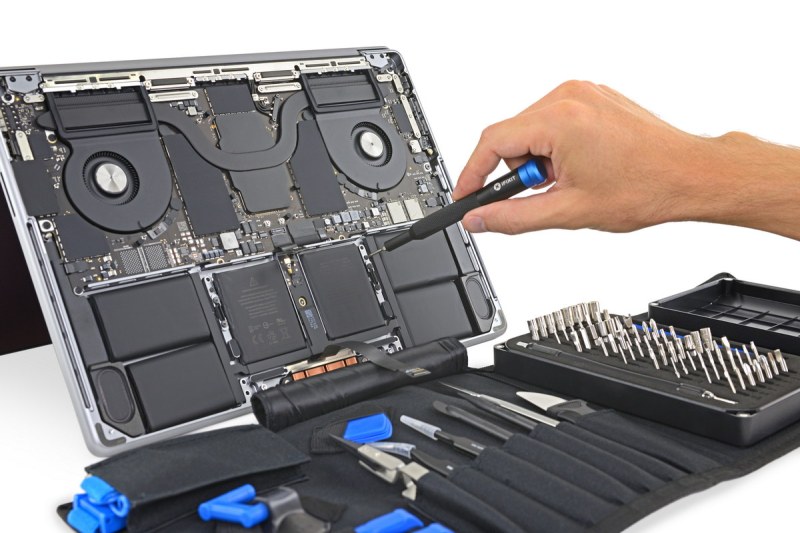
What's happening: The logic board (also called the motherboard) is the central circuit board that connects and coordinates every component in your MacBook. A failed logic board is serious, but not always fatal to the machine. Many logic board failures are caused by a specific failed component — a capacitor, a power management chip, or a failed GPU — rather than the entire board being destroyed.
The fix: Logic board repair or replacement. We perform component-level diagnostics to determine whether repair is possible before recommending a full board replacement. We'll give you a transparent assessment of what's feasible and what it will cost.
4Corrupted macOS or Software Issue
Symptoms: MacBook shows the Apple logo but hangs on the loading bar. Boots to a folder with a question mark icon. Crashes immediately after startup. May have started after a macOS update or an improper shutdown during an update.
What's happening: The macOS system files can become corrupted due to a failed update, a sudden power loss during writing to the drive, or a damaged sector on the storage drive. The question mark folder icon specifically indicates that the Mac cannot locate a valid startup disk — either the OS is corrupt or the drive has failed.
The fix: We boot from an external drive or Apple's recovery partition to diagnose the issue. In many cases, a macOS reinstall resolves the problem without data loss. If the storage drive itself is failing, we may need to replace it and restore from a backup.
5RAM or Storage Failure
Symptoms: Three beeps on startup (older MacBooks), persistent kernel panics, MacBook starts but immediately crashes to a black screen, or the Mac freezes before the login screen appears.
What's happening: On older MacBooks with removable RAM, a loose or failed memory module can prevent the machine from posting (starting the initial hardware check). On newer Apple Silicon MacBooks, the RAM is integrated into the SoC chip — failures here are more complex. Storage failure (SSD degradation) can also prevent the OS from loading, even when hardware is otherwise functional.
The fix: On older models with removable RAM, reseating or replacing the RAM modules often solves the problem. Storage issues are diagnosed with drive health tools, and failing SSDs can be replaced on most MacBook models.
6Liquid Damage
Symptoms: MacBook stopped working after liquid contact. May have worked briefly after the spill before dying. Could show signs like keyboard keys not working, trackpad behaving erratically, or display flickering before complete failure.
What's happening: Liquid and electronics don't mix. Even a small amount of water, coffee, or juice can cause corrosion on the logic board, short out components, or damage the battery. The severity depends heavily on how quickly the machine was powered off after the spill and how quickly it received professional cleaning.
The fix: Professional liquid damage treatment involves disassembly, ultrasonic cleaning of the logic board, corrosion removal, and thorough drying before testing. The sooner you bring it in after a spill, the better the prognosis. Do NOT attempt to turn on a liquid-damaged MacBook — doing so can cause short circuits that destroy components that would otherwise be repairable.
What To Try Before Bringing It In
If your MacBook isn't turning on, there are a few safe steps you can try at home before visiting us. These won't fix a hardware problem, but they can resolve certain software or firmware glitches:
SMC Reset (Intel MacBooks only)
The System Management Controller handles power functions. To reset it on a MacBook with a non-removable battery: shut down, then press and hold Shift + Control + Option + Power for 10 seconds. Release, then press the Power button normally. On MacBooks with Apple Silicon (M1/M2/M3), the SMC is part of the chip — simply shut down, wait 30 seconds, and try restarting.
PRAM / NVRAM Reset (Intel MacBooks)
This resets certain system settings stored in non-volatile memory. Turn on the Mac and immediately press and hold Command + Option + P + R for about 20 seconds. The Mac may appear to restart. Release the keys and allow startup to proceed normally. Note: NVRAM reset is not applicable to Apple Silicon Macs.
A note on T2 chip MacBooks
MacBooks with Apple's T2 security chip (most Intel models from 2018 onward) have additional security features that can affect startup behavior. If the T2 chip detects a problem, it may prevent the Mac from booting. This typically requires professional diagnostics and sometimes an Apple Configurator restore — something we can help with.
When To See a Professional
If your MacBook:
- Shows no response at all despite a known-working charger
- Has been exposed to liquid
- Has a physically damaged port, screen, or case from a drop
- Boots to a question mark folder or spinning globe
- Goes through repeated startup attempts without completing boot
- Has already been through an SMC and NVRAM reset with no improvement
...it's time to bring it to a professional. Continuing to force-start a MacBook with a hardware problem can cause additional damage that makes repairs more expensive or data recovery more difficult.
At MNM Computers, our diagnostic is always free — we'll tell you exactly what's wrong and what it will cost to fix it before we do anything. Visit us at 7613 Greenback Lane in Citrus Heights. We also handle all other MacBook repair services and general laptop repair for all brands.
Frequently Asked Questions
Why won't my MacBook turn on even when plugged in?
If your MacBook won't turn on while plugged in, the most common causes are a faulty charger, a damaged charging port, a failed logic board, or severe battery swelling that has triggered a safety shutoff. Try a different charger first. If the problem persists, bring it in for a free diagnostic at MNM Computers — we can pinpoint the exact cause quickly.
How much does it cost to fix a MacBook that won't turn on?
The cost depends on the root cause. A battery replacement typically runs $129–$199. A charging port repair is often $79–$129. Logic board repair or replacement is more involved and can range from $199 to $499 depending on the model and the nature of the failure. We provide a free diagnostic and a firm quote before any work begins.
Can data be recovered from a MacBook that won't boot?
In most cases, yes. If the storage drive itself is intact, we can often recover your files even when the MacBook won't boot at all. Bring it in for a free diagnostic and we will let you know the recovery options before any repair work begins.